
GPU Orchestration Explained: Meaning, Benefits & How It Powers AI Workloads
Blog / GPU Orchestration Explained: Meaning, Benefits & How It Powers AI Workloads
As the use of Artificial Intelligence (AI) is rapidly expanding, enterprises are rushing to optimize their internal hardware configurations which require massive computational power with Graphics Processing Units (GPUs). However, they are expensive to operate and idle computation quietly drains budgets, making it essential that they are well-managed to maximize cost-effectiveness. GPU orchestration serves as the critical management layer that solves this problem. To utilize these expensive assets effectively rather than wastefully, businesses must first understand the meaning of GPU orchestration and its practical benefits.
With GPU orchestration explained in this article, you’ll see how dynamic scheduling transforms basic server clusters into high-performance AI engines, giving your enterprise a distinct competitive advantage in today’s fast-paced digital market.
What is Orchestration Used For? The Meaning of GPU Orchestration
In broad computing terms, orchestration is used to automate the configuration, management, allocation, and coordination of complex computer software, hardware, and storage systems.
When applied to graphics hardware, GPU orchestration is an automated process used to allocate, schedule, and manage GPU resources across multiple workloads, users, or teams within a shared computing environment. Rather than assigning a physical GPU to a single task and letting it sit idle between jobs, an orchestration layer continuously tracks which GPUs are available, matches them to incoming workloads based on demand and priority, and reclaims capacity the moment a job finishes.
In other words, to systematically arrange tasks with GPU orchestration, meaning no computing power sits unused while other jobs queue, is ultimately an exercise in precise coordination to ensure every resource is maximized.
This coordination matters because AI training and inference jobs rarely arrive at a steady, predictable pace. A research team might need eight GPUs for 6 hours today and none tomorrow, while a separate inference service needs constant, low-latency access around the clock. Without orchestration, engineers manually assign hardware, which can lead to conflicts, wasted capacity, and slower project timelines.
What is GPU in Kubernetes and How Does It Work?
“GPU in Kubernetes” refers to the physical GPU resource exposed inside container pods via Kubernetes plugins/drivers. Standard Kubernetes only recognizes basic computing nodes; by adding GPU-aware device plugins, Kubernetes gains full visibility into specialized hardware metrics like VRAM capacity and compute engine availability.
The 4-Stage GPU Orchestration Lifecycle
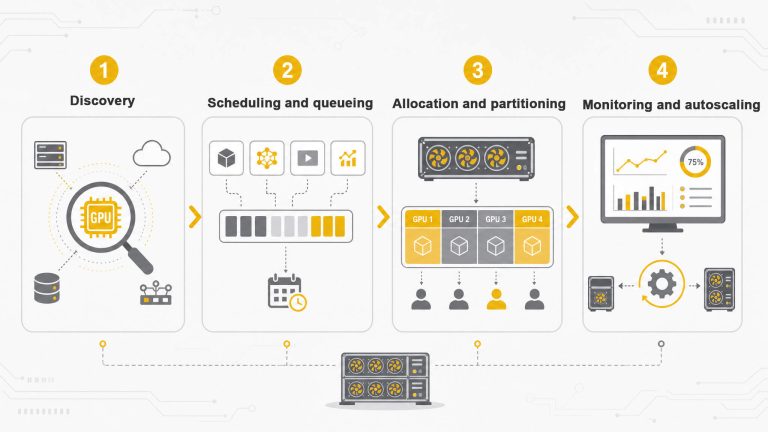
Modern GPU orchestration platforms built on Kubernetes operate through a consistent 4-stage lifecycle to keep clusters running smoothly:
- Discovery: The orchestration layer first identifies every available GPU in the cluster, including its memory capacity, current load, and physical location relative to other GPUs (its topology).
- Scheduling and queueing: Incoming jobs are placed in a queue and matched to the GPUs best suited to their requirements, factoring in priority, fairness across teams, and how urgently the workload needs to run.
- Allocation and partitioning: Once matched, GPU capacity is assigned to the workload, which can be a whole GPU or just a fraction of one through partitioning technologies that let several smaller jobs share a single card.
- Monitoring and autoscaling: Tracks utilization continuously and automatically scales workloads up or down, reassigning GPUs the moment a job completes so the next task in line starts immediately.
The Importance of Physical GPU Topology
To understand how Kubernetes places workloads effectively, you must understand physical topology, meaning how physical GPUs are wired together inside a server (e.g., via NVLink vs. standard PCIe slots). Topology directly dictates data transfer speeds and communication latency between cards.
Instead of viewing every GPU as just another interchangeable piece, topology-aware scheduling takes into consideration the physical connections between GPUs, meaning workloads that require a lot of communication are assigned to GPUs that are linked by faster connections, optimizing performance.
Key Benefits of GPU Orchestration Explained
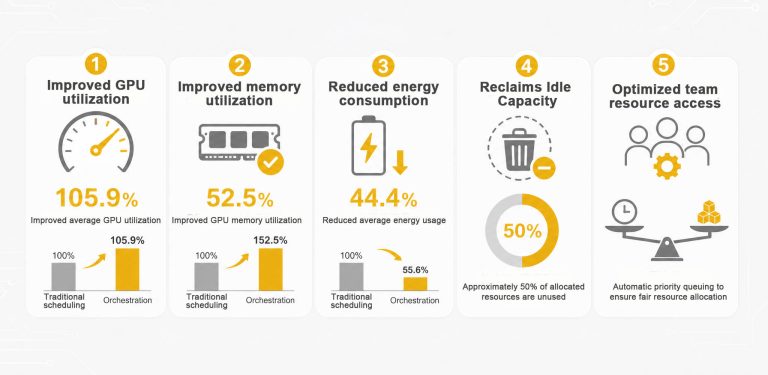
While GPU orchestration benefits businesses in plenty of ways, the advantages are easiest to see when you compare a scheduler that understands GPUs against one that does not. In a peer-reviewed benchmark, a resource-aware GPU scheduler was measured against standard Kubernetes GPU scheduling on an ML inference cluster:
| Benefit Area | Default Kubernetes Scheduling | Resource-Aware Orchestration | Measured Result |
|---|---|---|---|
| GPU Utilization | GPUs are bound one job at a time and sit idle between assignments | Jobs are continuously queued and assigned instantly | +105.9% average GPU utilization [1] |
| Memory Efficiency | VRAM sits unused if task doesn't fill the card | VRAM is dynamically monitored and shared | +52.5% higher GPU memory usage [1] |
| Energy Consumption | Idle nodes remain powered on unnecessarily | Workloads are packed tightly onto active nodes | 44.4% lower average energy use [1] |
| Capacity Waste | ~50% of provisioning goes unused [2] | Automated reclaiming fills idle gaps | Maximizes return on capital expenditure |
| Team Access | Manual requests cause project bottlenecks | Automated priority queuing ensures fair access | Eliminates team scheduling conflicts |
However, to fully realize the advantages of GPU orchestration explained above, an AI-ready infrastructure is required to handle that constant workload. With orchestration being the software brain that keeps hardware working efficiently, an AI infrastructure is the physical muscle needed to execute everything and ensure that running your hardware at 100% capacity doesn’t bring the entire physical infrastructure crashing down.
Why It Matters to Your Business?
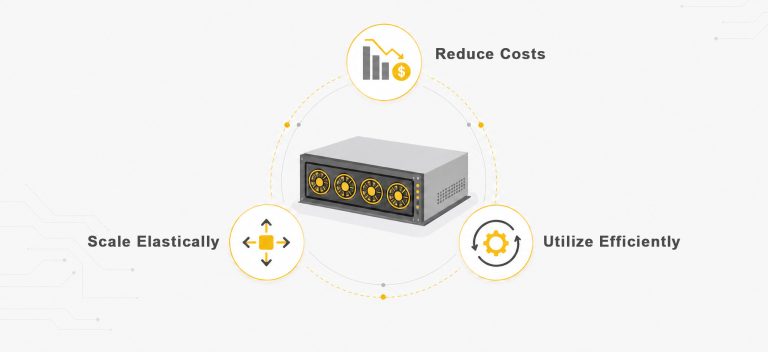
The benefits above translate directly to different parts in a business like finance and operations, which often require immersive processing demand. Beyond the apparent raw efficiency boost, running the orchestration process grants businesses with the operational agility to swiftly respond to AI demands. Training workloads can spike unpredictably, inference traffic can surge with product launches, and research priorities may vary by week.
However, since GPUs remain one of the most expensive line items in any AI infrastructure budget, and a GPU that sits idle is not a neutral cost, it is capacity a business has already paid for but is not using. An orchestrated GPU environment absorbs these fluctuations automatically instead of requiring engineers to manually reprovision hardware every time priorities shift.
From Software Orchestration to AI-Ready Data Center|One Asia
With the meaning of GPU orchestration explained above, it becomes clear that intelligent software management is only half the equation, it requires equally capable physical infrastructure to deliver results. OneAsia offers comprehensive, purpose-built AI-ready Data Center solutions that complement the benefits of using GPU orchestration, featuring high-performance computing, advanced cooling, and redundant power distribution designed specifically for heavy-duty machine learning.
Our proprietary AIOps portal, OAsis, provides a centralized platform for managing and optimizing your dynamic workloads effortlessly. Through our GPU-as-a-Service model, you can scale capacity dynamically based on your specific needs without massive upfront capital expenditure. Stop wasting valuable compute resources and start optimizing your infrastructure today. Contact us today to get a tailored data center service plan and find out how our high-performance ecosystem can support your ambitions.
References:
- Schloss Dagstuhl – Leibniz Center – Resource Aware GPU Scheduling in Kubernetes Infrastructure
- Energy Technologies Area, Berkeley Lab – 2024 United States Data Center Energy Usage Report