What Are IaaS, PaaS, and SaaS? A Complete Guide with Examples and Use Cases
Blog / What Are IaaS, PaaS, and SaaS? A Complete Guide with Examples and Use Cases
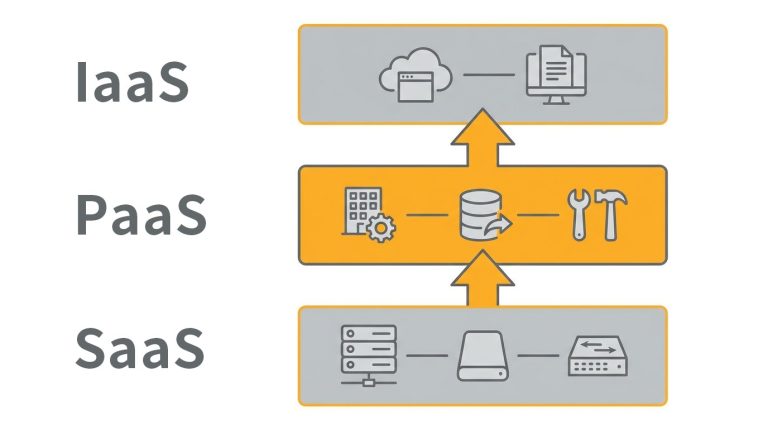
In the wave of digital transformation, choosing the right cloud service model has become a key factor in improving operational efficiency. To build an effective IT architecture, the first step is understanding what IaaS, PaaS, and SaaS mean.
From underlying infrastructure to end-user applications, each service model defines the level of control, responsibility, and flexibility an enterprise holds. This article explores how these models work and compares their differences through practical examples, helping you identify the best fit for your business needs.
The Three Core Cloud Service Models: IaaS, PaaS, and SaaS Explained
To understand cloud computing, it is essential to first grasp the meaning of IaaS, PaaS, and SaaS. These three models represent different layers of cloud services, each designed to meet varying technical and business requirements:
IaaS (Infrastructure as a Service)
IaaS is the most fundamental layer of cloud services. Providers deliver virtualized computing resources such as virtual machines (VMs), storage, and networking infrastructure.
Users retain the highest level of control and are responsible for installing operating systems and deploying applications.
PaaS (Platform as a Service)
PaaS provides a complete platform for application development and deployment. In addition to infrastructure, the provider manages the operating system, databases, and development tools.
Developers can focus on writing code without worrying about managing underlying servers, significantly improving development efficiency.
SaaS (Software as a Service)
SaaS is the most user-facing model. Applications are delivered over the internet and accessed through a browser or app, with no need for installation or maintenance.
All backend updates and system management are handled by the provider, allowing businesses to start using the software immediately.
Key Differences Between IaaS, PaaS, and SaaS
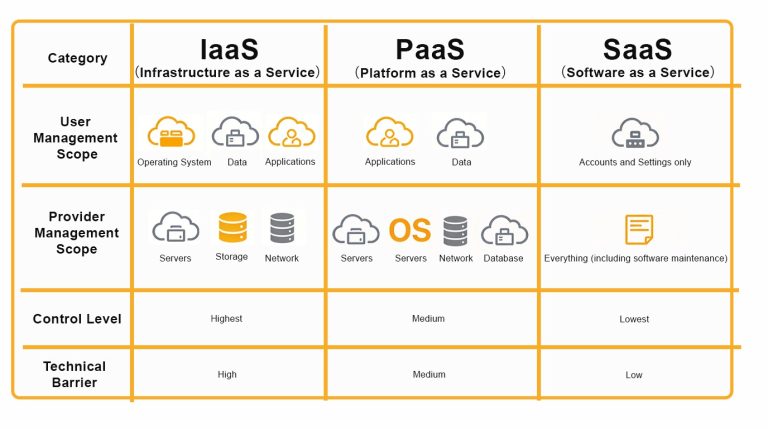
The simplest way to distinguish between IaaS, PaaS, and SaaS is by looking at how responsibilities are divided. As you move up the service stack, user responsibilities decrease while provider responsibilities increase:
| Category | IaaS | PaaS | SaaS |
|---|---|---|---|
| User Responsibilities | Operating system, data, applications | Applications, data | Account and configuration only |
| Provider Responsibilities | Servers, storage, networking | Servers, OS, networking, databases | Full stack, including software maintenance |
| Level of Control | Highest | Moderate | Lowest |
| Technical Complexity | High | Medium | Low |
Control vs Convenience: Finding the Right Balance
At its core, the difference between IaaS, PaaS, and SaaS comes down to how enterprises balance control and convenience:
- IaaS: Offers full control over underlying resources, making it ideal for businesses that require deep customization of system architecture. However, it also comes with the highest maintenance responsibility and technical complexity.
- SaaS: Prioritizes ease of use with a ready-to-deploy model. It minimizes IT maintenance effort and enables rapid deployment, though at the cost of reduced customization flexibility.
- PaaS: Strikes a balance between the two. It removes the need to manage underlying servers while preserving flexibility for application development, effectively balancing development efficiency and operational workload.
Use Cases of IaaS, PaaS, and SaaS
Looking at real-world examples makes it easier to understand how these cloud service models are applied in business environments and what problems they solve:
IaaS Use Cases
Enterprises can rent virtual machines and cloud storage, deploy websites and testing environments, and connect systems through virtual networks to enable efficient disaster recovery and resource allocation. Common examples include:
- Amazon Web Services (AWS) EC2: One of the most widely used cloud computing services globally. Businesses can rent scalable computing capacity to host websites or run applications.
- Microsoft Azure Virtual Machines: Provides virtual Windows or Linux environments within Microsoft’s cloud ecosystem, making it ideal for organizations already using Microsoft solutions.
- Google Compute Engine (GCE): Built on Google’s global infrastructure, offering high-performance virtual machines, particularly strong in big data analytics and AI/ML workloads.
Business scenarios: Suitable for organizations that require scalable storage, high-performance computing for research projects, or full control over server configurations for big data analytics.
PaaS Use Cases
Development teams can use cloud-based platforms to build and deploy applications directly, focusing on code and user experience while reducing the burden of server management, software updates, and OS maintenance. Common examples include:
- Google App Engine: Developers simply upload code, and the platform automatically handles scaling, load balancing, and deployment.
- Heroku: A popular platform among startups, supporting multiple programming languages and simplifying the path from development to deployment.
- Red Hat OpenShift: An enterprise-grade Kubernetes platform suitable for organizations requiring hybrid cloud deployments.
Business scenarios: Ideal for rapid prototyping, API development and management, and building custom internal systems.
SaaS Use Cases
Enterprises adopt cloud-based CRM systems, collaboration tools, or office suites that can be accessed via browsers, enabling real-time collaboration across distributed teams with automatic data synchronization and backup. Common examples include:
- Microsoft 365: Combines email, scheduling, and cloud-based document collaboration, widely used to enhance productivity and administrative efficiency.
- Salesforce: A leading global CRM platform that helps businesses drive sales growth through data insights.
- Dropbox: Provides secure cloud storage and file synchronization, addressing cross-device access, large file transfers, and version control.
Business scenarios: Suitable for remote work, cross-regional collaboration, HR management, and optimizing day-to-day business operations.
How Should Businesses Choose Between IaaS, PaaS, and SaaS?
After understanding the differences between IaaS, PaaS, and SaaS, enterprises should evaluate their options not only from a technical perspective but also based on internal capabilities, budget, and data control requirements:
1. Businesses That Require Full Control
Organizations with mature IT teams and strict regulatory requirements, such as those in finance or government sectors, are best suited for IaaS.
This model allows enterprises to manage cloud resources similarly to their own data centers, retaining full control over operating systems and application environments. It is particularly suitable for legacy system migration scenarios such as lift-and-shift.
2. Businesses Focused on Development Speed
For software companies and startups that prioritize application development, PaaS eliminates the need to manage underlying infrastructure.
Developers can leverage pre-built frameworks and modules to rapidly build and deploy products, significantly shortening development cycles while focusing resources on user experience and core functionality.
3. Businesses Seeking Fast Deployment of Business Tools
For non-technical business needs such as HR systems, email services, or CRM platforms, SaaS is the most cost-effective option.
Enterprises can start using applications immediately through a subscription model without any upfront development cost. This makes SaaS especially suitable for small and medium-sized businesses looking to reduce IT maintenance efforts while achieving quick business results.
How Should Enterprises Choose a Deployment Model?
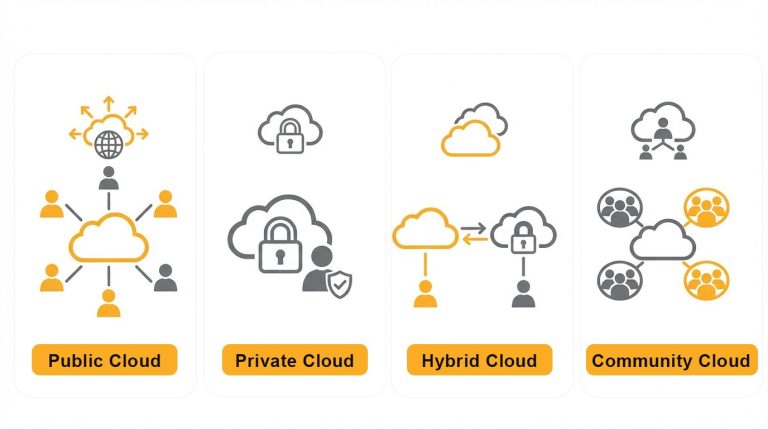
In addition to selecting between IaaS, PaaS, and SaaS, businesses must also consider how cloud resources are deployed. Choosing the right deployment model helps balance security, cost, and scalability:
- Public Cloud: Resources are owned and managed by service providers and shared among multiple users. This model offers high flexibility and eliminates the need for hardware maintenance, making it ideal for businesses that require rapid scaling and geographic flexibility.
- Private Cloud: A dedicated cloud environment built for a single organization. It is suitable for industries with strict data security and compliance requirements, such as finance and healthcare, offering greater control and privacy.
- Hybrid Cloud: Combines the advantages of both public and private clouds. Enterprises can keep sensitive data, such as customer information, in a private cloud while leveraging public cloud resources for less sensitive workloads.
- Community Cloud: A shared cloud environment used by organizations with common requirements, such as industry regulations or security standards. Resources are accessible only within the specific community.
OneAsia Helps Optimize Your Cloud Architecture
After understanding the meaning and differences between IaaS, PaaS, and SaaS, the next step is choosing the right partner.
OneAsia provides end-to-end cloud hosting solutions, from highly flexible IaaS virtual data centers to platforms and database management services that support rapid deployment. Each solution is tailored to different stages of an enterprise’s digital transformation journey.
Through practical implementation and a wide range of IaaS, PaaS, and SaaS solutions, OneAsia helps clients achieve optimal cost efficiency while maintaining high standards of security and performance.
Whether you are a startup or a multinational enterprise, we can support you in building a stable and scalable cloud foundation from the ground up.
References:
- TechTarget – Software as a Service (SaaS)
- Microsoft Azure – Cloud Computing Dictionary: What is SaaS?