
What Is Cloud Migration? Methods and Steps for Moving to the Cloud
Blog / What Is Cloud Migration? Methods and Steps for Moving to the Cloud
Are you facing challenges in your company’s digital transformation journey? Are you considering moving your data, applications, and services to the cloud but unsure where to begin? In today’s rapidly evolving technology landscape, cloud migration has become a key strategy for improving operational efficiency, reducing costs, and increasing business flexibility. This article explains how enterprises can select the right cloud migration methods and steps based on their specific needs, enabling a smooth transition to digital operations and a more efficient future.
What Is Cloud Migration? Why Move from Traditional Infrastructure to the Cloud
Traditional IT environments typically rely on fixed capital investment, advance capacity planning, and periodic maintenance and upgrades. This approach requires significant upfront financial and human resources. In addition, inaccurate resource forecasting, whether overprovisioning or underprovisioning, can lead to unnecessary costs or negatively affect system performance and user experience.
As digital transformation accelerates, cloud migration allows enterprises to move data, infrastructure, and applications to cloud platforms. Resources can then be scaled dynamically based on real-time demand, enabling a better balance between cost and performance.
Although cloud migration commonly refers to moving applications and data from on-premises data centers to the cloud, it may also include transferring workloads between different cloud platforms. This article focuses on the scenario of migrating applications and data from on-premises environments to the cloud.
What Are the Benefits of Cloud Migration?
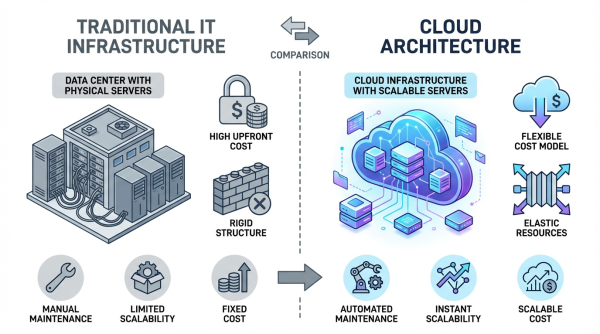
Cloud environments not only address the limitations of traditional IT in terms of cost, flexibility, and resource allocation, but also provide higher computing performance and stronger business competitiveness. The following sections outline the key advantages enterprises can gain after migrating to the cloud.
Reduce Costs and Improve Resource Utilization
One of the most immediate and visible benefits of cloud migration is cost reduction and improved resource utilization. Because cloud platforms adopt a pay as you use model, they help enterprises:
- Reduce upfront capital expenditure (CapEx): After migrating to the cloud, businesses no longer need to purchase large volumes of servers and related equipment in advance, significantly lowering initial investments in data center construction and hardware procurement.
- Optimize operating expenditure (OpEx): The pay as you use pricing structure converts fixed costs into flexible operating expenses. This reduces the risk of idle equipment due to overestimation or performance constraints caused by underestimation of demand.
- Minimize infrastructure maintenance burden: Once systems are migrated to the cloud, enterprises can significantly reduce the manpower and time required for hardware maintenance and periodic upgrades.
Increase Flexibility and Scalability
Through cloud migration, enterprises can fully leverage the flexibility of cloud architecture and adjust computing resources according to actual workload requirements. During peak business periods, resources can be expanded quickly to ensure system stability under high traffic. When demand decreases, resources can be scaled down appropriately to avoid unnecessary expenses. This enables businesses to respond more effectively to market changes.
Strengthen System Reliability
Another major advantage of cloud migration is enhanced system reliability. Enterprises can deploy workloads across multiple geographic regions to build highly fault tolerant architectures. If connectivity issues or service disruptions occur in one region, such as hardware failures, natural disasters, or unexpected incidents, services can automatically switch to other available zones to maintain business continuity.
Accelerate Innovation
Migrating applications, data, and infrastructure to the cloud not only reduces costs and optimizes resource allocation, but also accelerates development cycles. With systems deployed in the cloud, teams gain easier access to emerging technologies such as artificial intelligence, machine learning, and big data analytics. They can rapidly establish testing environments, shorten development cycles, and reduce time to market.
Enhance Information Security
From a data protection perspective, cloud migration can strengthen an enterprise’s security posture. By moving systems and data to cloud platforms with comprehensive security mechanisms, organizations can leverage compliant cloud services that offer international security certifications such as ISO 27001, multi-layer encryption mechanisms, access governance, and identity authentication features to safeguard critical information assets.
Further reading: What Cybersecurity Risks Are Associated with Generative AI? An Overview of AI Data Security and Protection Methods
Five Cloud Migration Strategies
To successfully move to the cloud, the first step is selecting the right migration strategy. Different organizations vary in size, system complexity, and transformation goals. Each approach differs in terms of required changes, cost, timeline, and the level of cloud benefits achieved. Some strategies focus on speed, others on optimization, while some involve rebuilding the architecture entirely. Below are five of the most common cloud migration approaches.
1. Rehost
Rehosting is the most straightforward and fastest cloud migration method. This approach involves moving applications and data to the cloud without modifying the existing system architecture. The entire environment is transferred as is, without changing code or adjusting architectural configurations.
Suitable for:
- Organizations that need to migrate quickly due to time constraints, such as an upcoming data center shutdown
Systems that are relatively simple and can run in the cloud without restructuring
Enterprises that want to complete the initial cloud transition first and optimize in later phases
2. Replatform
Replatforming involves migrating applications and data to the cloud while making limited technical adjustments. Examples include adopting cloud-optimized databases, upgrading the operating system, or using managed cloud services. These changes do not affect core functionality but allow the system to run more efficiently in a cloud environment.
Suitable for:
- Medium-sized enterprises (approximately 500 to 5,000 system users)
- Systems that have been in operation for years and are experiencing performance limitations but cannot undergo major changes
3. Refactor
Refactoring is the most extensive migration approach and offers the greatest opportunity to fully leverage cloud capabilities. This strategy involves deep modification of applications so they align with cloud-native architecture. Examples include breaking monolithic applications into microservices, redesigning database structures, or rewriting portions of the code.
By fully utilizing cloud features such as auto-scaling and elastic computing, this approach does more than move systems to the cloud. It redesigns them to operate optimally in a cloud environment.
Suitable for:
- Enterprises whose current systems no longer meet performance requirements and that seek long-term operational benefits while being able to support higher upfront investment
- Enterprises that rely heavily on IT infrastructure and require high performance, real-time processing, or complex business logic
- Digital-driven companies that prioritize innovation, agility, and frequent feature iteration
4. Repurchase
Repurchasing is a replacement-based migration strategy. Instead of continuing to use existing systems, organizations adopt new cloud-based solutions, typically Software as a Service (SaaS). This approach replaces on-premises systems with cloud-native platforms, such as moving from a self-hosted CRM to a cloud CRM like Salesforce, or replacing a legacy ERP with a cloud solution such as NetSuite.
Suitable for:
- Enterprises with outdated systems and no strong need to retain legacy platforms
- Enterprises that want to quickly migrate a department or entire business function to the cloud
Further reading: Infrastructure for Software Services: Understanding Cloud Service Models and Cloud Computing Deployment Models
5. Relocate
Relocate is an environment-level cloud migration approach that involves moving existing virtual machines (VMs) or entire application environments from on-premises to the cloud as-is, without altering the application architecture or system configurations. This migration method is similar to rehosting, but relocate focuses on transferring the execution environment rather than transforming the application itself.
Suitable for:
- Enterprises already using virtualization technologies (e.g., VMware, Hyper-V) with a large number of VMs to migrate.
- Enterprises that want to maintain their existing system configurations, permissions, and deployment patterns while gradually optimizing in the cloud.
Cloud Migration Methods Comparison Table (Advantages, Disadvantages, and Suitable Use Cases)
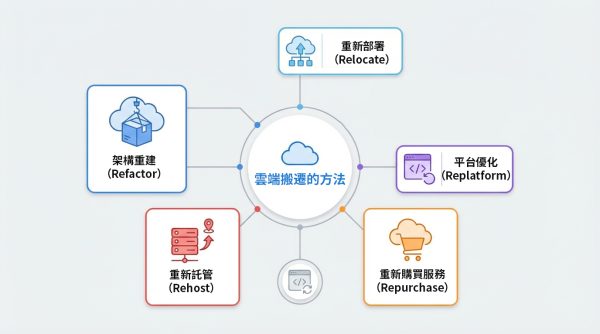
| Cloud Migration Method | Advantages | Disadvantages | Suitable For |
|---|---|---|---|
| Rehost | Fastest, minimal changes, low initial cost | Existing problems are migrated unchanged; unoptimized migration may increase long-term costs | Time-constrained migrations, simple systems, organizations that prefer "migrate first, optimize later" |
| Replatform | Performance improvement, supports flexible scaling, more complete cloud functionality | Migration is more complex, requires technical adjustments and testing | Medium-sized enterprises, systems needing performance improvements |
| Refactor | Maximizes cloud benefits, enables AI/ML and big data | Long duration, high cost, requires skilled personnel | Complex systems requiring high performance, agile development focus |
| Repurchase | Quick deployment, simple maintenance, standardized processes | Requires learning new usage methods; platform differences from legacy customizations | Organizations replacing old systems, quickly adopting SaaS |
| Relocate | Preserves original environment, simple migration path, minimal technical changes | Architecture is unoptimized, cloud flexibility may not be fully leveraged | Enterprises with many VMs or already using virtualization technologies |
Cloud Migration Steps
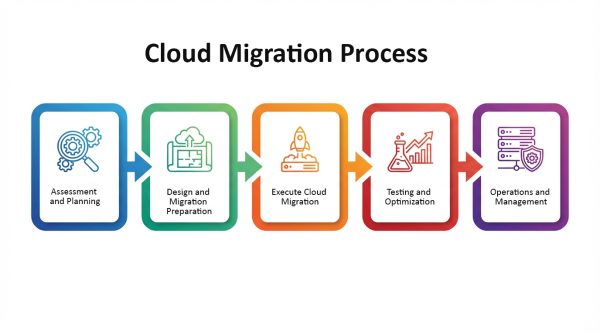
Cloud migration involves system inventory, architecture adjustments, data transfer, and ongoing management. Regardless of the chosen migration method, the overall process generally follows similar steps, though the technical depth varies: the closer a migration is to re-architecting, the more time and effort are required during preparation and testing; the closer it is to a full relocate or rehosting approach, the simpler the process. The steps are as follows:
1. Assessment and Planning
Before moving systems to the cloud, enterprises need to conduct a comprehensive review of existing systems, including application architecture, hardware, and databases. This phase should clarify which systems to migrate first, establish migration objectives, perform risk assessments, and allocate budgets, laying the groundwork for subsequent migration.
2. Design and Migration Preparation
Based on the assessment, enterprises need to plan the cloud environment architecture. This phase includes network configuration, information security policies, data storage architecture, identity and access management, and backup strategies. For platform optimization or re-architecting approaches, preparation will involve more technical planning and adjustments to application logic.
3. Execute Cloud Migration
Once the migration phase begins, systems and data are moved to the cloud according to the chosen migration method. For example, rehosting directly moves virtual machines or applications to the cloud; platform optimization may involve replacing certain platform components; re-architecting includes optimizing and upgrading the architecture. Migration tools, such as database synchronization tools or application migration tools, may be used during this phase to ensure a smooth and complete migration process.
4. Testing and Optimization
After migration, all services must be verified to function properly in the cloud. This requires conducting functional tests, performance tests, load tests, and security tests. Based on test results, enterprises should make adjustments, such as tuning server resources, optimizing database queries, and modifying auto-scaling rules, to ensure the cloud environment operates stably post-migration.
5. Operation and Management
It is recommended to establish monitoring mechanisms, event alerts, cost management, and information security policies to ensure that the cloud environment continues to operate normally after migration. Additionally, enterprises can continuously optimize system architecture and resource allocation to support long-term operational growth.
Facing Digital Transformation? OneAsia Provides Professional Cloud Migration Services
Cloud migration involves adjustments to overall system architecture, data transfer, security control, and organizational coordination. During the migration process, enterprises may face multiple challenges, including system-cloud compatibility issues, risk of data loss during large-scale transfers, service downtime pressure, and compliance with cybersecurity regulations. Choosing the right migration method, combined with careful planning, is essential to reduce downtime and risk while fully realizing the benefits of the cloud.
As a leading data center and cloud migration service provider in Hong Kong, OneAsia understands the challenges enterprises face when planning and executing cloud migration. Our team possesses professional cloud migration expertise—from initial assessment, detailed planning, and project management to the actual transfer of equipment and data—all aimed at minimizing downtime, reducing risk, and safeguarding corporate data. If your enterprise is planning a cloud migration, contact OneAsia to have a professional team assist you in achieving a digital future safely and efficiently.
References: